goodChatBot vs Shopify Inbox: Is Shopify's Native Chat Enough for Your Store?
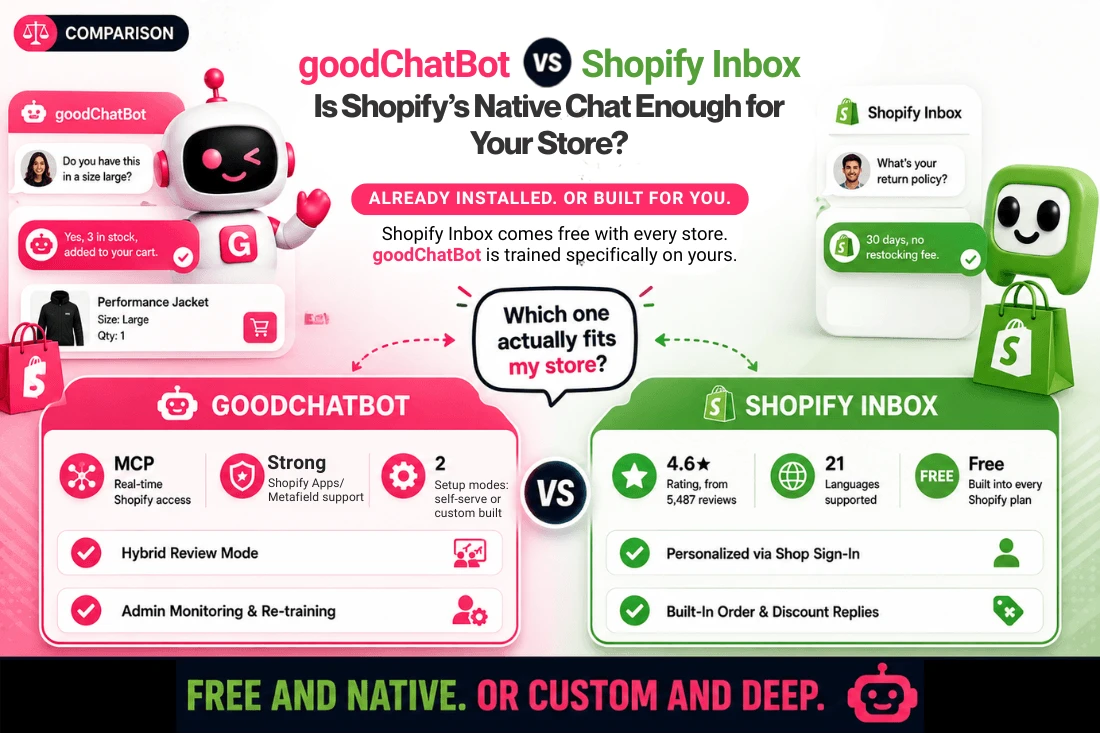
Table of Contents
Every Shopify store has a chat option built into the admin, free, pre-installed, no setup required. The question this guide answers is whether that built-in shopify chatbot goes deep enough for a given store, or whether a purpose-built alternative like goodChatBot is the better fit.
This guide compares goodChatBot and Shopify Inbox on four points: how each chatbot for shopify is trained, how deeply each integrates with Shopify, what channels each one covers, and what real merchants are currently reporting about both.
Before You Compare Features
Both tools are free to start. Both now use AI to answer shopper questions rather than relying only on scripted replies. Both are actively changing, Shopify Inbox was recently updated, and goodChatBot is expanding its setup options and integrations. The differences that matter are depth of Shopify integration, training method, and track record, not whether AI is involved at all, since both now qualify as an ai chatbot for shopify.
What Is goodChatBot?
goodChatBot is a chatbot for business built around two modes: a self-serve setup for teams that want to move fast, and a custom-built mode where a team trains the AI on a store's product catalog, policies, connected apps, and past support conversations before it talks to a customer. It connects directly to Shopify's MCP Server, giving it real-time access to product details, policies, and customer data so it can handle cart actions, checkout, and order status inside the chat window.
Hybrid Mode lets a human review AI replies before they go out. Fully Automated Mode goes a step further, letting the AI respond to shopper questions around the clock,while admins can review any conversation, take over, or send an additional response when necessary. It was Fully Automated Mode specifically that helped one client reduce their support staff from five people to one.
The team is also building out omnichannel support and deeper CRM integrations. We cover these sales-focused capabilities in more depth in our best Shopify AI chatbot features to look for.
goodChatBot also includes a feedback option, letting store owners thumbs-down an AI answer and provide the correct one, which retrains the chatbot so it gives the right answer the next time. It can also chat with customers in more than 60 languages, though the admin interface is currently available in English only.
What Does Shopify Inbox Actually Do Now?
Shopify Inbox is no longer just a live chat widget with saved replies and automated greetings. As part of Shopify's broader Shopify Magic AI suite, Shopify has repositioned Inbox as an AI-powered sales associate that answers shopper questions directly from a store's catalog and policies, with no additional setup required.
When a buyer signs in with Shop, the Inbox agent personalizes replies using their past purchases and preferences. Merchants set the agent's tone, style, and rules, and can run Inbox with or without the AI agent active. Instead of a structured training process, Inbox improves through merchant feedback, staff rate individual chat replies, and the agent adjusts based on that input over time. It is free on every Shopify plan and connects to Shopify Admin and the Online Store. Its public listing does not mention a connection to Shopify's MCP Server or to Metafields.
Its named feature set includes live discount code sharing and order status updates directly inside chat, along with product recommendations, quick replies, and automated FAQs. Inbox supports 21 named languages, including English, French, German, Italian, Japanese, Spanish, and Chinese (Simplified and Traditional), among others. It also includes built-in analytics covering orders assisted and buyer satisfaction, giving merchants a way to track chat performance directly in the Shopify admin.
goodChatBot vs Shopify Inbox: Quick Comparison
| Criteria | goodChatBot | Shopify Inbox |
|---|---|---|
| Primary Focus | Shopify AI sales and support chatbot | Native AI sales associate built into Shopify |
| Shopify Native Integration | Yes, built around Shopify's MCP Server | Yes, native, via Shopify Admin and Online Store |
| Integration with Shopify Apps | Deep integration | None |
| Training Method | Two modes: self-serve and managed custom build | Learns from catalog and policies, improves via merchant chat ratings |
| Custom Training | Website blogs, external documents, old support conversations, and PDFs | Training on custom content is not supported |
| Metafields/App Integration Support | Strong Shopify Apps and Metafields support | Not mentioned |
| Orders, Returns | Yes | Yes |
| Multichannel Support | Website-focused today, with more channels on the roadmap | Online Store and Shop app only |
| Language Support | 60+ languages for chat responses; admin UI currently in English only | 21 named languages |
| Built-In Analytics | Add to cart, orders, new customers acquired, and average conversation length | Orders assisted and buyer satisfaction |
How Deep Does Each One Integrate With Shopify?
goodChatBot connects directly to Shopify's MCP Server and carries strong Shopify Metafield support, pulling specs, fitment data, or custom fields into a live conversation. Shopify Inbox does not list Metafield-level access in its public feature set. goodChatBot has also written its own MCP servers connecting to multiple Shopify apps, including Judge.Me, Advanced Shipping Manager, APO Product Options, Year Make Model, and Request a Quote, to name a few.
A store with a catalog full of variants or technical specifications is exactly where this matters most for any chatbot for ecommerce website deployment, and it's the most practical difference between the two.
How Is Each One Actually Trained?
goodChatBot supports two modes on setup: self-serve, and a managed custom setup. In custom setup, a team trains the AI on a store's product catalog, connected Shopify apps, external content, and past support conversations, and, with admin notifications for ongoing issue monitoring and re-training. Shopify Inbox learns automatically from a store's catalog and policies, then improves as merchants rate the quality of its replies. This is a lighter, more hands-off model than a managed build, with less structure behind how it improves over time. Our earlier piece on why so many AI chatbot projects fail to deliver covers why that structure matters.
The Recent Update Merchants Are Talking About
Shopify Inbox introduced a requirement for customers to sign in before starting a chat in a recent update. Merchant reviews from mid-2026 report removed navigation options and, in some cases, lost leads because shoppers would not create an account to ask a question. Shopify has confirmed in at least one review response that the sign-in requirement can be turned off in Inbox's chat settings. This is a current, verifiable example of how a native, platform-wide tool's behavior can change for a merchant without much advance notice or control.
Which One Reaches More Channels?
Shopify Inbox covers the Online Store and the Shop app, where a signed-in buyer's history can inform a reply. goodChatBot is website-focused as of now, with WhatsApp, email, and SMS integrations on its roadmap rather than live. Neither tool currently offers broad omnichannel reach, so this is a parity point, not an advantage for either side.
Whose Track Record Can You Actually Check?
Shopify Inbox has a large, independently visible review base: 4.6 out of 5 from 5,487 reviews on the Shopify App Store, with 80 percent of those reviews at five stars. goodChatBot is not listed on the Shopify App Store, so its evidence comes from direct case studies rather than an open review system. Both are legitimate forms of evidence, but they are different kinds of proof, and it matters which one you are actually evaluating before deciding.
Shopify Inbox's Real Strengths
Free, pre-installed, and requiring no setup are concrete advantages, particularly for smaller teams. Personalization through Shop sign-in, support for 21 named languages, built-in analytics on orders assisted and buyer satisfaction, and a large, checkable review base add credibility a newer or unlisted tool cannot match. As one of the best chatbots for customer service already sitting inside Shopify's admin, it is a reasonable default starting point.
Shopify Inbox's Open Questions
There is no listed Metafield-level product data access, no channels beyond the Online Store and Shop app, and no integration with Shopify Apps. The improvement model depends on manual chat ratings rather than a structured retraining process. The recent sign-in update is a live example of how little control a merchant has over changes to a native, platform-owned tool.
There is no listed Metafield-level product data access, no channels beyond the Online Store and Shop app, and no integration with Shopify Apps. The improvement model also depends on manual chat ratings rather than a structured retraining process.
goodChatBot's Real Strengths
goodChatBot's core strength is depth. Direct Shopify MCP Server access, strong Metafield support, and a custom-built mode trained on a store's catalog, apps, and support history add up to a level of customization a general-purpose ai based chatbot typically does not match. For stores with complex catalogs, that combination makes it one of the best ai chatbot app options available today.
goodChatBot's custom-built mode is also trained by an expert team working directly with a store's own data, so it functions as a chatbot for business that responds the way the store owner actually would, not with generic, one-size-fits-all replies. That training does not stop at launch, ongoing feedback and fine-tuning keep improving the assistant's answers over time.
goodChatBot's Open Questions
goodChatBot is Shopify-only as of now, with omnichannel coverage still on the roadmap rather than live. It is not listed on the Shopify App Store, so there is no independent public review base to point to, its evidence comes from case studies instead.
Which One Fits Your Store?
Shopify Inbox fits stores that want a free, already-installed option and do not depend heavily on Metafield-level product data or data from Shopify Apps. goodChatBot fits stores whose catalog leans on Shopify Metafields and Apps for specs, fitment, or detailed variants, and that want the option to go deeper with a managed, custom-trained build as a shopify ai chatbot.
Final Verdict: goodChatBot vs Shopify Inbox
Both tools aim to turn conversations into sales rather than just answer questions, from different starting points. Shopify Inbox offers a large, checkable track record and zero-setup convenience because it is built into the platform. On the other hand, goodChatBot (engineered by the automation specialists at Automatikly) offers deeper Shopify-specific customization through Model Context Protocol (MCP) Server access, custom AI agent workflows, and Metafields/App Integration Support, giving merchants the flexibility to start fast or go fully custom. The right choice depends on whether proven, native convenience or deeper, store-specific precision matters more for a given store.
Curious how a custom-trained AI chatbot would perform on your own store? Contact us and we'll show you.
Frequently Asked Questions
Is Shopify Inbox actually AI-powered now?
Yes. Shopify has repositioned Inbox as an AI-powered sales associate that answers shopper questions directly from a store's catalog and policies, a change from its earlier live-chat-with-saved-replies design.
Does Shopify Inbox cost anything?
No. Shopify Inbox is free on every Shopify plan, with no separate pricing tier.
Does Shopify Inbox support Shopify Metafields?
Its public feature listing does not mention Metafield-level access. goodChatBot carries strong Shopify Metafield support as part of its shopify chatbot integration.
Does Shopify Inbox integrate with Shopify Apps?
No. Shopify Inbox's public listing shows no integration with third-party Shopify apps. goodChatBot connects directly to apps like Judge.Me, Advanced Shipping Manager, APO Product Options, Year Make Model, and Request a Quote.
Why are some merchants unhappy with the recent Inbox update?
A recent update requires customers to sign in before starting a chat. Merchants have reported a removed navigation option and reduced lead capture as a result. Shopify has confirmed the sign-in requirement can be turned off in chat settings.
Does goodChatBot have as many reviews as Shopify Inbox?
No. Shopify Inbox has 5,487 reviews on the Shopify App Store. goodChatBot is not listed on the Shopify App Store, so its track record comes from direct case studies instead.
How many languages does Shopify Inbox support?
Shopify Inbox supports 21 named languages, including English, French, German, Italian, Japanese, Spanish, and both Simplified and Traditional Chinese. goodChatBot can respond in more than 60 languages as well.
Which one reaches customers on more channels?
Neither reaches far beyond the website today. Shopify Inbox covers the Online Store and Shop app. goodChatBot is website-focused with additional channels on its roadmap.
References
-
1. Shopify App Store, Shopify Inbox listing, ratings and feature details: https://apps.shopify.com/inbox
-
2. Shopify Help Center, Shopify Magic and Inbox documentation: https://help.shopify.com/en/manual/inbox
-
3. goodchatbot.com, Product and Features pages: https://goodchatbot.com/